Intersection Accident Simulator
A downloadable game for Windows and macOS
# Intersection Accident Simulator Desktop App - User Manual
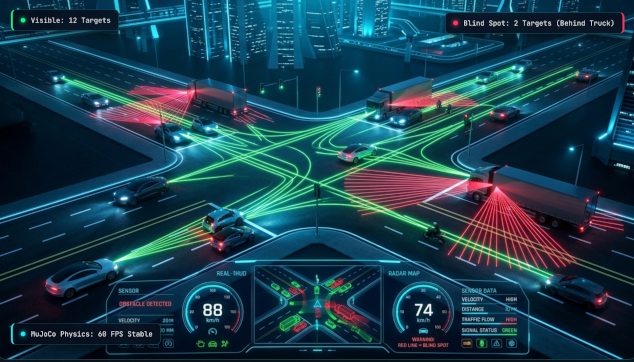
This application is a desktop simulator for traffic accident analysis, sightline tracking, and blind-spot awareness at a two-lane intersection and surrounding town loop block (figure-of-eight course), powered by **MuJoCo WASM** physics and **Three.js** 3D rendering.
---
## 1. Installation and Setup
### macOS
1. Open `Intersection Accident_1.0.0_aarch64.dmg`.
2. Drag and drop the app icon into your `Applications` folder.
3. If macOS displays a Gatekeeper prompt ("unidentified developer"):
- Go to `System Settings` > `Privacy & Security` and click "Open Anyway", or
- Right-click (or two-finger click) the app icon in Finder and select "Open".
### Windows
1. Run `Intersection Accident_1.0.0_x64-setup.exe` (NSIS Installer) or `Intersection Accident_1.0.0_x64_en-US.msi`.
2. If Windows Defender SmartScreen appears:
- Click **"More info"**, then click **"Run anyway"**.
---
## 2. Interface Overview
```
┌─────────────────────────────────────────────────────────────┐
│ 🛰 [Overhead Radar / Sightlines] [HUD: Speed · State · Hidden]│
│ │
│ │
│ 3D Simulation Viewport │
│ │
│ │
│ 🕹 [Mode] [Camera] [Pedals] [Speed] [Settings] [Replay]│
└─────────────────────────────────────────────────────────────┘
```
1. **Main 3D Viewport**:
- Renders realistic rigid-body vehicle dynamics, collision impulses, suspension movement, and ragdoll physics upon impact.
2. **🛰 Overhead Radar & Sightlines (Top-Left)**:
- Tracks the ego vehicle from above. Real-time raycasts (`mj_ray`) are drawn from the driver’s eye position:
- **Green lines**: Target vehicles/pedestrians currently visible to the driver.
- **Red lines**: Blocked by trucks, oncoming vehicles, or pillars (Blind spots).
3. **HUD Dashboard**:
- Displays speed, current state (approaching, waiting to turn, red light, etc.), signal phase, completed laps, collisions, and hidden vehicles in blind spots (`👁 n hidden`).
4. **Collision Banner & Log (Right Side)**:
- Records every collision event with timestamp, impact speed, and involved agents (e.g. `Ego × Motorcycle 38 km/h`).
---
## 3. Driving Modes
Toggle using the **Mode button** in the lower control bar or press **`M`**.
| Mode | Description |
|---|---|
| 🤖 **Auto** | Fully autonomous navigation around the figure-of-eight town loop. The ego vehicle evaluates oncoming vehicle speeds, sightlines, and safe gaps before executing turns and lane changes. |
| 🦶 **Pedal** | Steering and lane keeping are automated, but **acceleration, cruise hold, and braking are controlled manually by you**. Experience the risk of gap judgment when turning right across oncoming traffic. |
| 🎮 **Manual** | **Full manual control of steering (`←`/`→`) and pedals**. You can also leave the designated loop and freely explore the entire town layout (±170 m). |
---
## 4. Camera Views
Toggle using the **Camera button** or press **`V`**.
| View | Description |
|---|---|
| 🪟 **Driver** | First-person perspective from the driver's seat. Ideal for observing real blind spots created by pillars and large opposing vehicles. |
| 🚗 **Chase** | Third-person tracking camera behind the ego vehicle. |
| 🎥 **Orbit** | Free-form inspection camera. Left-click drag to rotate, mouse wheel to zoom, right-click drag to pan. |
| 📹 **Corner** | Fixed CCTV traffic camera stationed on the south-east corner light pole. |
---
## 5. Keyboard Shortcuts
| Key | Function |
|---|---|
| `Enter` | **Start / Pause** simulation |
| `M` | **Cycle driving mode** (Auto ⇄ Pedal ⇄ Manual) |
| `V` | **Cycle camera view** (Driver ⇄ Chase ⇄ Orbit ⇄ Corner) |
| `S` | Toggle **Traffic Settings** panel |
| `R` | Enter / Exit **Replay Mode** |
| `L` | Toggle **Language** (English ⇄ Japanese) |
| `1` / `2` / `3` / `4` | Set **Simulation Speed** (0.25× / 0.5× / 1× / 2×) |
| `Space` / `W` | [Pedal/Manual] **ACCEL** (Accelerate) |
| `H` | [Pedal/Manual] **HOLD** (Maintain speed) |
| `B` | [Pedal/Manual] **BRAKE** (Apply brakes) |
| `←` / `→` | [Manual Mode] **Steer Left / Right** |
| `C` | [Manual Mode] **Center steering** |
| `Esc` | [Replay Mode] Exit replay |
---
## 6. Traffic Settings & Crash Factors
Press **`S`** to open the settings drawer and customize variables:
- **North–south / East–west traffic (veh/min)**: Traffic flow volume.
- **Typical speed (km/h)**: Cruise speed of surrounding vehicles.
- **Trucks (%)**: Proportion of large vehicles. Higher values obstruct sightlines significantly.
- **Motorcycles (%)**: Higher values increase frequency of classic right-turn ("smidsy") collisions.
- **Pedestrians / Bicycles (/min)**: Frequency of crosswalk crossings.
- **Accepted gap (seconds)**: Time buffer the ego driver waits for before executing turns. Reducing this setting induces frequent turning collisions.
- **Reaction time (seconds)**: Delay before other drivers initiate emergency braking.
- **Yellow-light runners (%)**: Percentage of traffic accelerating through amber signals.
- **Pull over before left turns**: Toggles hugging the curb prior to left turns to prevent motorcycle hooking accidents.
---
## 7. Replay & Video Export
Press **`R`** or click **🎞 Replay** to review past driving sessions:
- **Play / Pause**: Press `Space`
- **Seek**: Press `←` / `→` (2 seconds skip) or drag the timeline slider
- **Free Camera**: Switch cameras at any time during replay
- **💾 Save**: Export the recording as a session file for future playback
- **📂 Open**: Load and inspect previously recorded sessions
- **⏺ Video**: Record and export high-quality **WebM video** from the active camera
- **✕ Exit**: Return to live physics simulation
---
Purchase
In order to download this game you must purchase it at or above the minimum price of $3.30 USD. You will get access to the following files:
Leave a comment
Log in with itch.io to leave a comment.